
Registry
If you would like to browse our wedding registry, it can be found at this link.
Your thoughtfulness and generosity are deeply appreciated.

Step-by-Step Instructions
We have opted to set up our registry through a platform called Joy. Joy has allowed us to curate our registry with no limitations as to where gifts are purchased from. If you are not familiar with the Joy platform, feel free to utilize the below step-by-step guide as a resource.
STEP 1
Select the gift that you would like to purchase.

STEP 2
Review the item you selected.
Be sure to scroll to the bottom of the listing for notes, instructions, and preferences.
In the example below, the red box points out where to look for these details.

STEP 3
Click "Buy Now."

STEP 4
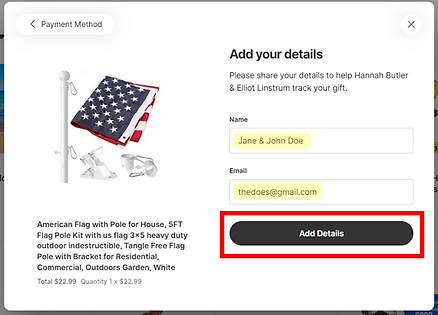
Fill out your name and email address. Click "Add Details."
STEP 5
Select "Basic Gift Note" and add a note if desired. Click "Next."

STEP 6
Read the instructions and click "Got it."

STEP 7
Click "Copy" to copy our mailing addresss then click "Got it" to proceed.

STEP 8
Click "Let's go to _________" to be redirected to the item
directly on the website where you will purchase the gift.

STEP 9
Purchase the gift on the website that you have been redirected to.
Make sure to select any preferences as detailed on the gift description (refer to Step 2).
Be sure to paste our address into the appropriate place when asked for the mailing address. As a reminder, our mailing address is 1623 Caille Court, Fort Mill, South Carolina 29708.
STEP 10
Return to the Joy tab to confirm that the gift has been purchased.
Click "Yes, I did."

STEP 11
Add your purchase details to your Joy submission.
Order Number is required, Tracking Number is optional.
Click "Save."

STEP 12
Your gift has been marked as purchased on the registry!
Click "All Done."
